intensity-normalization
Normalize the intensities of magnetic resonance (MR) images — T1-w, T2-w, FLAIR, PD-w, and more — across scanners, sites, and sessions.
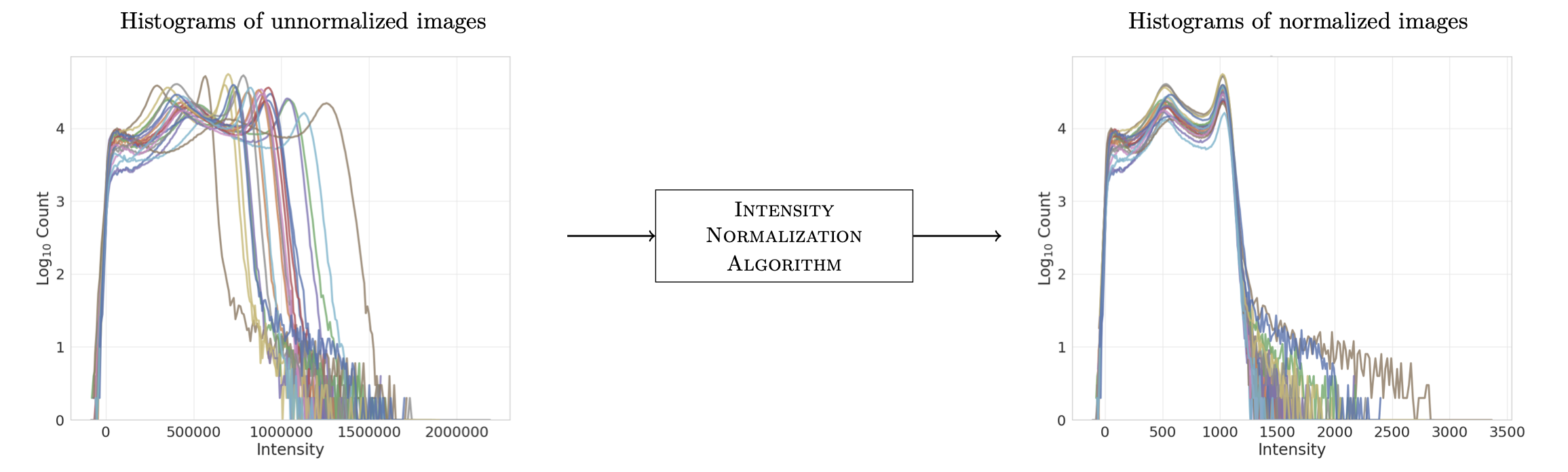
Left: foreground intensity histograms of unnormalized T1-w images from the same scanner and protocol. Right: the same images after (FCM) normalization.
Why?
MR images have no consistent intensity scale: the same tissue gets different intensities across scanners, pulse sequences, and even sessions on the same scanner. That inconsistency is an acquisition artifact, not a feature of the data — and it breaks downstream processing, especially machine learning, which usually assumes the data was drawn i.i.d. from one distribution. This package implements the standard fixes; see the pre-print for their measured impact on an image synthesis task.
Install
Optional extras:
pip install "intensity-normalization[ants]"   # RAVEL registration, preprocess, coregister
pip install "intensity-normalization[plot]"   # histogram plotting
(With uv, use uv add for the same packages, or run the CLI without installing: uvx intensity-normalize --help.)
30-second example
import intensity_normalization as inorm

normed = inorm.whitestripe(t1w_image, mask=brain_mask)  # numpy or nibabel in, same type out

# population method: fit once, apply to new scans
tx = inorm.nyul.fit(training_images, masks=training_masks)
normed_new = tx(new_image)
tx.save("nyul.npz")
or from the command line:
Next: Quickstart · How-to guides · Choosing a method